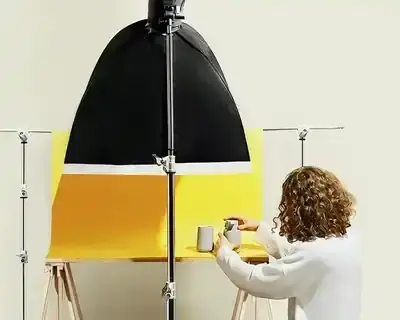
The best profile picture shows a face in soft window light against a calm or colourful background, or one strong subject that people recognise in a circle smaller than a fingernail. To take a good profile picture yourself, stand by a window, hold the phone at eye level, step back about 1.5 m, zoom in 2x or 3x and let your face fill around 60% of the frame. Then check it in a 40 px circle, the size shown next to a Facebook post (our measurement from 28 October 2026).
Below: 30 ideas with example photos, 9 tips, a circle test tool and sizes from the help pages of six platforms.
30 good profile picture ideas
The ideas come in 6 groups of 5, each with a note on what is left of it in the small circle next to your name.

Plain and coloured backgrounds


- Coloured wall. Pink or turquoise makes the circle a patch of colour people spot at once.
- Warm beige. Suits most skin tones and keeps attention on the face.
- White on white. Bright and clean, but it glows in dark mode.
- One strong accent. Red lipstick or coloured glasses still stand out at 40 px.
- Card backdrop. A 70 × 100 cm sheet of coloured card on a door replaces a studio backdrop.
Business portrait


- Headshot in a bright room. Shoulders up, a blurred window behind you.
- A prop from your job. A tablet, a helmet or tailor’s scissors show what you do.
- Contrast. A dark blazer on a light background or the reverse: at 40 px the outline is what survives.
- Shot at work. A phone call or a glance past the lens looks like reportage.
- One series for the team. The same background, light and camera height for everyone.
Creative and aesthetic profile pictures


- Coloured light. A neon tube or a screen from the side gives half of the face a blue glow.
- Season in the background. Yellow leaves or snow make a portrait seasonal.
- Mural and prop. A big pattern and a playful object, like the bottle on the head above.
- Instant print. A photo from an instant camera, rephotographed and cropped inside the white border.
- Silhouette against the light. The circle shows the shape, not the features.

Cool profile pictures: flash and Y2K look
Cool profile pictures look as if they were taken in passing, with hard sun or flash in daylight: the 2000s look.
- Flash in full sun. It lifts the shadows under the eyes. Turn it on manually, as auto mode will not fire it.
- Café in profile. Cup in hand, eyes to the side, a bright area behind the head.
- Street at kerb height. Sit on a step, camera at eye level, face in the centre.
- Arm’s-length selfie. Hold the phone far away: from 30 cm the nose looks about 30% wider (tip 2).
- Two people, one picture. Stand close and crop tight.
Profile picture without a face

- A distant figure in a bold colour. A yellow jacket by the sea or a red coat in the snow.
- Your work tool. A camera, guitar or trowel on a plain background, shot like a packshot.
- Shadow on a wall. A hard shadow of your profile works like a logo.
- Pet. Let its face fill the circle: the whole animal becomes a blob at 40 px.
- Hand-drawn self-portrait. Use a thick line, because a thin one disappears when shrunk.
Shop, brand, team
- Logo on the brand colour. The mark at about 60-70% of the circle, no small lettering.
- Product in a tight crop. One bestseller that fills the circle (comparison below).
- Monogram or seal. A single letter reads better at 40 px than a full name.
- The team in the cover photo. Five people at 40 px are five dots.
- Your face for a personal brand. In a one-person business, people buy from a person.
How to take a good profile picture: 9 tips from a photographer
We use the same rules for product photos in the studio: light first, then distance, framing and background.
1. Window light

Shoot by a large window in daylight, facing it or at 45 degrees, with no direct sun on your face. Switch off the ceiling light: it casts shadows under the eyes. Outdoors, the light is softest on cloudy days and before sunset.
2. Distance and camera height

Close up, perspective enlarges whatever is nearest the camera: the nose. In a 2018 study by Ward and colleagues, a model showed that a selfie from 30 cm (12 in) makes the nose 30% wider relative to the face in men and 29% in women, while from about 1.5 m there is practically no distortion. So step back, zoom in 2x or 3x and keep the camera at eye level.
3. Framing for the circle

Almost every platform crops the profile picture to a circle that shows about 79% of the square, so put your face in the centre with a little space above your head. In tips from August 2024, LinkedIn recommends that your face takes up at least 60% of the picture.
4. Background

The safest choice is a plain or strongly blurred background that contrasts with your hair and clothes. Stand 1 to 1.5 m from the wall: you avoid a shadow, and portrait mode has something to blur (more on depth of field).
5. Colour and white balance
A face in the greenish light of a fluorescent tube or the orange light of a bulb looks unhealthy. Do not mix light sources: by the window, switch the lamps off, and when editing, correct the white balance until a white shirt looks white.
6. Sharpness
Tap the eyes on the screen to focus on them, and do not enlarge a face cut from a group photo. More in our guide to sharp photos.
7. Expression and posture

The best expression comes after a few minutes, once you stop posing. A few posing tips:
- Stand up straight and let your shoulders drop.
- Push your chin slightly forward and down for a sharper jawline.
- Look into the lens, not at the screen.
- Turn your body slightly to the side and your face to the camera.
8. Clothes

Dress as you would to meet the people your profile is for. Plain fabrics beat small checks and fine stripes, which shimmer when shrunk.
9. Editing and export
Correct brightness, contrast and white balance, and smooth the skin lightly at most. Save a square JPG of at least 800 × 800 px, and logos or text as PNG, as Facebook Help advises.
See your profile picture in a circle
The tool crops your photo to a circle and shows it at 176 px (Facebook Page), 98 px (YouTube channel) and 40 px (next to a Facebook post). It warns you when the file is too small, too large or over the MB limit.
Choose a photo or click an example. We show it cropped to a circle in the three sizes other people see: on a Facebook Page, on a YouTube channel and next to a post.
The photo stays in your browser: we do not upload anything.
The tool runs in your browser and needs JavaScript. We describe the result for the example below the tool.
or drag it here. JPG, PNG or WebP.
Example:
An example will appear in a moment.
Move the crop with the mouse or the arrow keys. On a phone, hold the photo for a moment and then drag it with your finger.
The 176 and 98 px sizes come from the Facebook and YouTube help pages. The circle next to a post on a public Facebook Page is 40 px, next to comments and in the story ring 32 px (our measurement from 28 October 2026, Chrome on a computer, logged out). Instagram, TikTok and WhatsApp do not give a display size.
The default example is the portrait from tip 3 (900 × 899 px): at 40 px the eyes and red hair are still visible. The wax seal is a photo by marszalstudio for Urbannote, published with the brand’s consent.
Profile picture size on 6 platforms
The table contains only figures from the official help pages. A dash means the help page gives no size.
| Platform | What the help page says | File | Source |
|---|---|---|---|
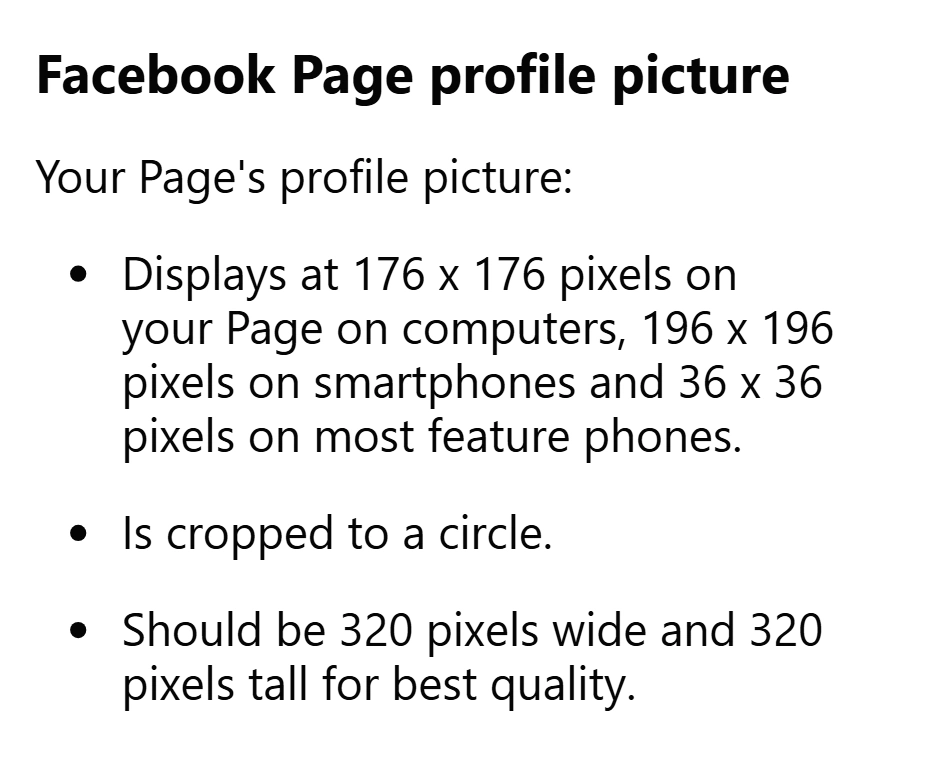
| Facebook, Page | shown at 176 × 176 px on computers and 196 × 196 px on smartphones, cropped to a circle; 320 × 320 px for best quality | PNG is better for a logo or text; no file size given | Facebook Help |
| LinkedIn, profile | 400 × 400 to 7680 × 4320 px | PNG or JPG, up to 8 MB, no GIFs | LinkedIn Help |
| LinkedIn, company Page | logo: at least 268 × 268 px, recommended 400 × 400 px | PNG or JPEG, up to 3 MB | LinkedIn Help |
| TikTok | at least 20 × 20 px | - | TikTok Help |
| YouTube | shown at 98 × 98 px; recommended on the help page graphic: 800 × 800 px | JPG, GIF (not animated), BMP or PNG, up to 15 MB | YouTube Help |
| Facebook profile, Instagram, WhatsApp | - | - | Facebook, Instagram, WhatsApp |
In practice one file is enough: an 800 × 800 px square JPG with the face or mark in the centre meets every figure in the table.
Facebook profile picture

Facebook gives profile picture sizes only for Pages. In our measurement from 28 October 2026 (Chrome on a computer, 1366 px window, logged out), the circle on a Page was 168 px, next to a post 40 px and next to comments 32 px.
How to make your Facebook profile picture look good
- Framing: face and upper chest, with no lamp or branch growing out of your head.
- How you look now: no filters and no photo from 10 years ago.
- One thing about you: clothes, a place or a prop that shows what you love.
Pro tip: Take 30-40 shots in 5 minutes: serious, smiling, into the lens and past it. Load the best 3 one by one into the tool above. The winner is the photo you still recognise in the 40 px circle.
Instagram profile picture

Instagram Help gives neither the size nor the shape of the profile picture. In our measurement from 28 October 2026, the circle on a computer was 150 px on the profile and 92 px in account suggestions. An Instagram profile is seen as a grid, so the circle should match it in colour and style (more in our guide to Instagram photos).
LinkedIn profile picture

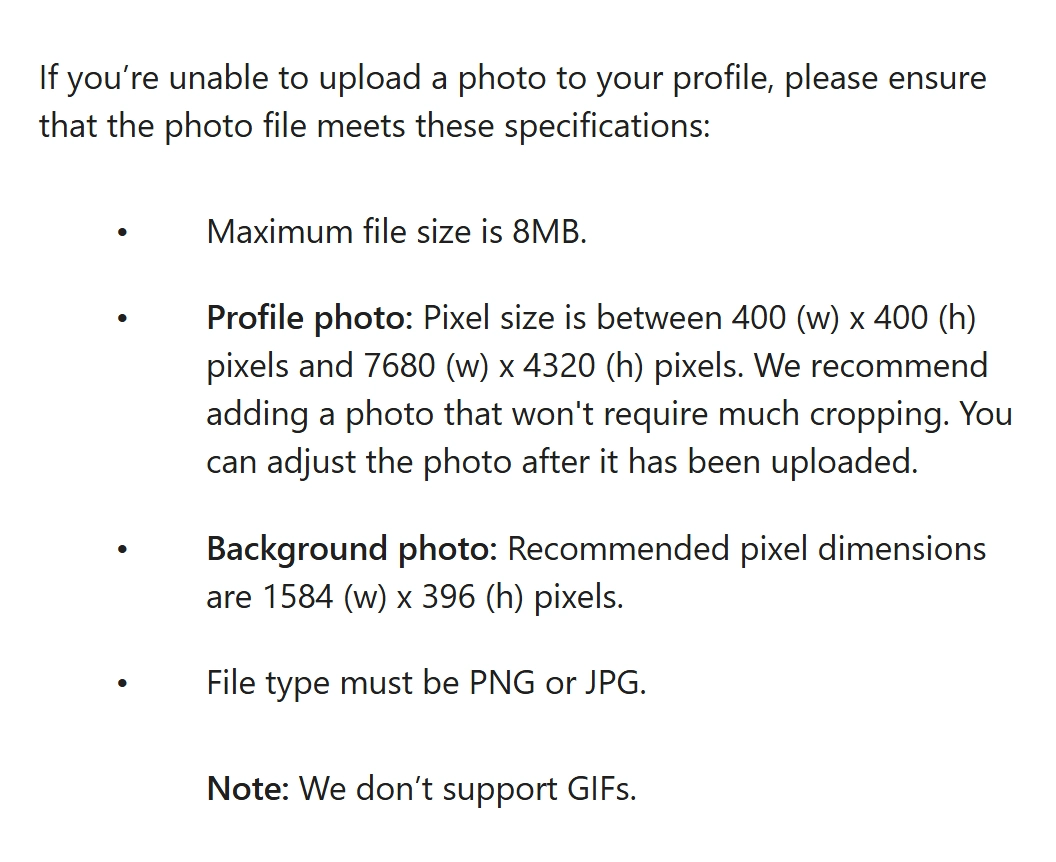
LinkedIn is the only one of the six platforms with full requirements: 400 × 400 to 7680 × 4320 px, PNG or JPG, up to 8 MB, no GIFs. According to the LinkedIn blog from August 2024, just having a picture makes a profile 14 times more likely to be viewed.
A headshot works best: shoulders up, a neutral background, the clothes of your industry. LinkedIn Help does not mention AI portraits, but it accepts an illustration, caricature or other artistic rendering of yourself if it reflects your likeness.
On LinkedIn, your photo should look the way you look at a client meeting.
WhatsApp profile picture

WhatsApp gives no profile picture size in its help, so an 800 × 800 px square with your face in the centre will do. It can be more personal than on LinkedIn, but by default any WhatsApp user can see it (how to change that).
TikTok and YouTube
TikTok gives only a minimum of 20 × 20 px. If you set a profile video, the photo no longer shows on your profile (TikTok Help).
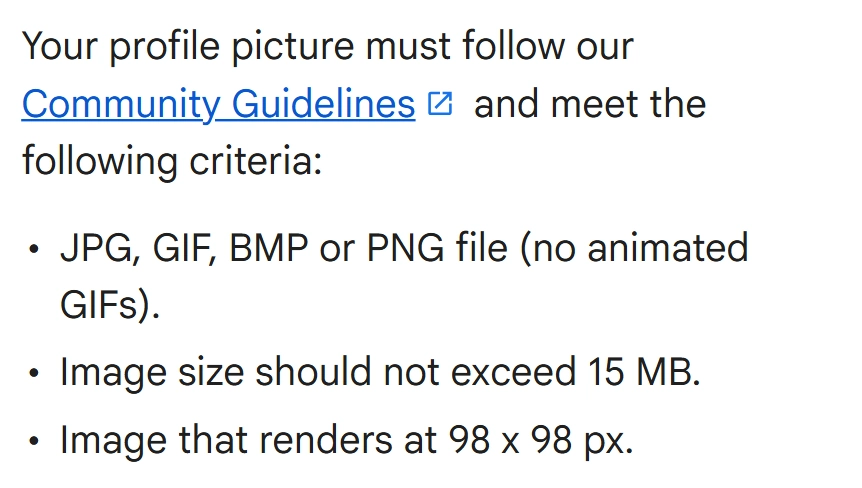
YouTube shows the channel picture at 98 × 98 px and accepts JPG, GIF (not animated), BMP or PNG up to 15 MB. On the graphic in its channel branding help, YouTube recommends an 800 × 800 px file.
Profile picture for a shop: logo or product?
For a shop, the circle is a sign that customers see at 40 px next to posts. We checked what is left of an Urbannote candle in it.

- Full packshot: at 40 px only a spot is left. Good for the shop, not for the circle.
- Tight crop: the WROCŁAW label is readable at 98 px, and at 40 px the jar still has its shape and colour.
- Brand mark: the black seal on black packaging works at 176 px, but at 40 px the W disappears.
Choose the logo if it is a simple, high-contrast mark, and the product if you sell one recognisable thing. LinkedIn shows a transparent logo on white and advises testing it on light and dark backgrounds; the tool above has a switch for that.
A product in the circle needs a photo with room for a tight crop. At marszalstudio a packshot on white costs €9 net and the JPG is 2000 × 2000 px (product photography pricing), more than Facebook and LinkedIn ask for even after cropping. Examples are on our packshot photography page.
What does your profile picture say about you?

Christian Rudder, co-founder of the dating site OkCupid, hid the text on some profiles, and the ratings barely changed: the text accounted for less than 10% of the score (Rudder’s 2014 post).
Your picture is worth that fabled thousand words, but your actual words are worth... almost nothing
Christian Rudder
In a 2006 study by Willis and Todorov, 100 milliseconds of looking at a face was enough to judge attractiveness, likeability, trustworthiness, competence and aggressiveness, much as people did without a time limit. It used photos of faces, not profile pictures, so treat it as a hint.
100 milliseconds of looking at a face is enough to judge whether someone seems trustworthy.
Based on: Willis and Todorov, Psychological Science, 2006

So plan your profile photo like a shoot: first the audience, then the framing. Recruiters look for competence, friends simply look for you.
Security and privacy

The profile picture is usually the most public part of an account. Facebook states that your current profile picture is public, and Instagram that it is visible even to people without an account.
Tips
- No address in the picture: a house number, a number plate or a distinctive view reveals where you live.
- No ID badges: a lanyard or a name badge reveals more than you want.
- A separate photo for dating apps: reverse image search easily links profiles of the same person.
Account security and privacy settings
On WhatsApp, any user can see your profile picture by default. In the privacy settings you can change this to My contacts, My contacts except… or Nobody (WhatsApp Help).
How to change your privacy settings on Facebook (official help)
Frequently asked questions
-
How do I take a good profile picture?
Face a window, step back 1.5 m and zoom in 2x or 3x with the phone at eye level. Let your face fill about 60% of the frame, then check it in a small circle.
-
What size is a Facebook profile picture?
Facebook shows a Page profile picture at 176 × 176 px on computers and 196 × 196 px on smartphones and recommends 320 × 320 px. Upload an 800 × 800 px square with your face centred.
-
What is the best profile picture for LinkedIn?
A recent headshot from the shoulders up, with your face filling at least 60% of the frame, a neutral background and work clothes. LinkedIn accepts 400 × 400 to 7680 × 4320 px.
-
What is a good WhatsApp profile picture?
A relaxed, recent portrait with your face filling the circle. WhatsApp gives no size, so an 800 × 800 px square works. By default any user can see it; change that in the privacy settings.
-
What does your profile picture say about you?
Whether you look trustworthy and competent: in a 2006 study by Willis and Todorov, 100 milliseconds of looking at a face was enough for that judgement. Clothes and background hint at your job.
-
What can I use as a profile picture instead of my face?
A distant figure in a bold colour, your shadow on a wall, your work tool, a pet or a hand-drawn self-portrait. At 40 px only shape and colour remain.
Summary: 5 rules for a good profile picture
- Window light, camera at eye level, 1.5 m from the face, with zoom.
- Face or mark in the centre, about 60% of the frame.
- A calm background that contrasts with your hair, clothes or product.
- One file: an 800 × 800 px square JPG, the logo as PNG.
- A test in a 40 px circle before you upload.

Change your profile picture when your appearance or the purpose of the profile changes, not every week, because people recognise you by the circle.