Cropping
Cropping is removing the outer parts of an image so that only the area you want remains: in camera, through where you stand and which focal length you use, or afterwards in editing software. The crop decides what the viewer sees first, in what proportions and with how much space around the product.
Wikipedia defines cropping as the removal of unwanted outer areas from a photographic or illustrated image, done to improve framing, isolate the subject or change the aspect ratio. When you shoot, you crop by moving the camera and choosing a focal length. Once the shot is taken, you cut the frame in software, which makes cropping part of post-production.
Crop in camera or in post?
| In camera | In post | |
|---|---|---|
| What you change | viewpoint, distance, focal length | the area and proportions of the finished file |
| Resolution | stays at full sensor size | drops with every strip you cut away |
| Perspective | you can still change it | fixed as it was shot |
| Best for | filling the frame, angle of view | platform formats, straightening, consistent margins across a series |
A workable rule: shoot with a little room around the product and set the final crop in post. That room lets one frame become a square for your shop and a portrait for social media without having to extend the background. Too much room, though, simply wastes pixels, as the section on aspect ratio shows.
Composition and cropping
Composition is how elements are arranged inside the image; cropping is the decision about where the image ends. You use the crop to fix the composition: trim a distracting edge, move the product closer to a strong point, change the proportions. That is why the two terms are so often mixed up.
The rule of thirds splits the frame with two horizontal and two vertical lines into nine equal parts and places important elements on those lines or where they cross. It works in styled and lifestyle shots, where the product shares the frame with a prop, a background that sets the mood or space for banner copy. We compare it with the golden ratio in golden ratio or rule of thirds.
A packshot follows different logic. The product sits in the centre with an even margin on every side, because a shop shows dozens of thumbnails next to each other and any shift stands out at once. That is closer to symmetrical balance than to the rule of thirds.

Common cropping mistakes
- Cutting off part of the product - a mug handle, the toe of a shoe, a bottle cap. Buyers may assume something is missing from the set.
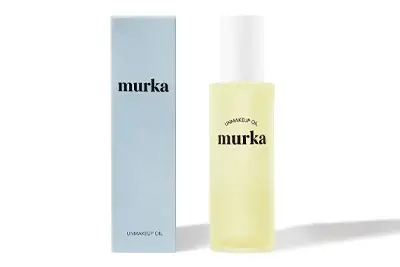
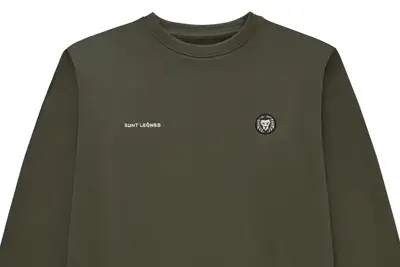
- Too tight - the product touches the edge and the thumbnail looks as if the platform clipped it.
- Too loose - in a product listing the item looks tiny and most of the thumbnail is background.
- A tilted line - a sloping horizon, table edge or bottle side. Straightening is part of cropping.
- Uneven margins across a series - in a category grid one product sits higher or looks bigger than the rest.
- Over-cropping - a small section blown up to the required size loses sharpness and detail.
From the studio: at marszalstudio the crop is part of the basic editing included in the price of every photo, together with exposure and colour. You can judge it during the live session: you mark each photo as OK or for correction and leave a note with a brush or a pin right on the image.
If you would rather receive finished, consistently cropped files than crop them yourself, see our packshots on a white background, from €9 net per photo without retouching.

Aspect ratio
Aspect ratio is the proportion between the width and the height of an image, written as 3:2 or 1:1. Your camera sensor records one ratio, while your shop, a marketplace or Instagram often needs another, so the ratio is the thing you change most often when you crop.
| Ratio | Where it comes from | Typical use for products |
|---|---|---|
| 3:2 | 35 mm film (36 × 24 mm frame), full-frame and APS-C cameras | landscape shots, styled scenes, blog images |
| 4:3 | most compact cameras, Four Thirds and Micro Four Thirds | shops built on a 4:3 template |
| 1:1 | an option on some cameras; Instagram's only format until August 2015 | product pages, marketplaces, category grids |
| 4:5 | the tallest portrait ratio Instagram accepts for published photos | portrait product posts |
| 16:9 | the HD television standard | homepage banners, sliders, frames taken from video |
| 5:4 | medium and large format cameras, 4 × 5 inch prints |
The origins of these formats are covered by Wikipedia (Aspect ratio). Changing the ratio always throws part of the image away: from a 3:2 file of 6000 × 4000 px the largest square is 4000 × 4000 px and the largest 4:5 portrait is 3200 × 4000 px. That is still plenty, but if you also zoom in on the product, it is easy to drop below a platform's minimum and lose the resolution needed for zoom or print.
How to choose a ratio for your shop
- One ratio across the whole catalogue. A category grid only looks tidy when every thumbnail has the same proportions.
- Check the shop template first, then crop. Find out which ratio your theme uses for thumbnails. A photo in another format gets trimmed or padded with empty bars.
- Tall products in portrait. A bottle or a garment on a hanger fills a portrait frame; a square leaves wide empty strips at the sides.
- Leave room for several formats. A single frame with a margin can be cropped to 1:1, 4:5 and 16:9.
Cropping product photos for Amazon UK, eBay, Etsy and Google
Cropping product photos means placing the product in the frame so the image meets a sales platform's rules: proportions, minimum size and how much of the frame the product itself takes up. Each platform sets its own rules, yet one well-prepared file can satisfy all of them.
| Platform | Proportions and size | Product in the frame | Background and extras |
|---|---|---|---|
| Amazon UK | 500 to 10,000 px on the longest side; 1,000 px or more enables zoom | about 85% of the frame | main image on pure white (RGB 255, 255, 255); no text, logos, watermarks, borders or inset images |
| eBay UK | at least 500 px on the longest side | not specified | no added borders, text, artwork, marketing material or watermarks |
| Etsy | shortest side 2000 px at 72 PPI recommended; files under 1 MB; Shop Home shows listing images as squares | not specified | not specified; Etsy advises photos that work in both square and rectangular crops |
| Google Merchant Center | min. 500 × 500 px for all products from 31 January 2027; around 1500 × 1500 px or more recommended; max. 64 MP and 16 MB | 75-90% of the image | no borders, watermarks or promotional overlays |
| from 4:5 (portrait) to 1.91:1 (landscape) | no rules | no rules |
The table is based on the Amazon UK product image guide, the eBay UK picture policy, Etsy's announcement on listing image size and ratio, the Google Merchant Center image specification and Meta's documentation for publishing Instagram images (checked in October 2026). Platforms change these rules, so check the current version before a large shoot.
The table gives a simple recipe for the main image: a 1:1 square at 2000 px per side, the product filling 85-90% of the frame, a pure white background. That one file clears Amazon's zoom threshold and 85% rule, eBay's minimum, Etsy's recommended size and Google's recommendation, and a square sits inside Instagram's range. The even margin also protects you when Etsy switches between square and rectangular crops; more on selling there in our guides to selling on Etsy UK and eBay UK.
Cropping a product photo step by step
- Straighten the photo. The vertical edges of a bottle, box or cabinet should be vertical and the line of the tabletop level.
- Set the ratio before you cut. Type the target format, such as 1:1, into the crop tool so the software holds it for you.
- Centre the product and set the margin. For Amazon and Google the product fills 85-90% of the frame; in your own shop keep one margin for the whole series.
- Check the edges. Nothing touches the border and nothing is cut off, unless it is a deliberate detail shot.
- Export at the required size. Scale down, not up: enlarging a file does not add detail.
- Look at the thumbnail. Shrink the photo to the size used in your product listing and check that the product still reads clearly.

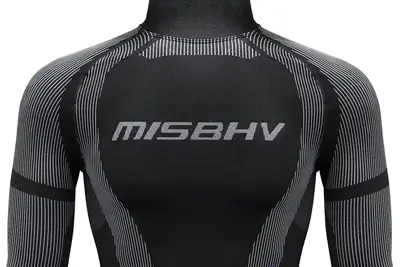
A frame with no margin, like the one above, works as a texture close-up further along the gallery. In the main image the whole product has to fit inside the frame, with a margin around it.
From the studio: the standard file from a marszalstudio shoot is a JPG of 2000 × 2000 px, 72 DPI, RGB, on a white background by default: a square that meets the size recommendations of every platform in the table. When a shop needs another format, the Individual size add-on sets the dimensions from your brief, and the 6K Resolution add-on (6000 px, 300 DPI) is there for printed catalogues.
Close-up
A close-up is a shot that tightly frames a person or object, showing the most detail and little or nothing of the wider scene. Film and television grade it by tightness: a medium close-up frames the head and shoulders, a close-up lets a single feature fill the frame, and an extreme close-up shows only a small detail.
Close-up in product photography
A packshot shows the whole product; a close-up answers the questions a packshot leaves open: what it is made of, how it is finished, what the label says. The close-up comes after the main image in the gallery, never instead of it. What to show up close:
- the texture of the material - the weave of a fabric, wood grain, brushed metal,
- the finish - seams, stitching, edges, engraving,
- the working parts - a zip, a clasp, a pump, a socket,
- the markings - composition, certification, information on the packaging.

Close-up vs macro
Strictly speaking, macro photography starts when the image on the sensor is life-size or larger, a reproduction ratio of 1:1. Close-up covers smaller magnifications, 0.1 to 0.5× in Wikipedia's table. Many lenses sold as "macro" actually work in the close-up range, with a maximum ratio between 1:2 and 1:1.
For jewellery or small mechanisms, check the reproduction ratio in the lens specification before you buy; our article on when to use a macro lens explains what to look for. True macro is covered in the glossary entry on macrophotography.
Depth of field up close
The closer you get, the shallower the depth of field: as the macro article puts it, depth of field is extremely small when focusing on close objects. With a flat detail, stopping down the aperture is enough, but with a deep product, such as a ring with a raised stone, the front and back are rarely sharp at once. That is where focus stacking helps: several frames focused on different planes are merged into one.
- Dust and fingerprints - invisible in a packshot, they are the first thing a buyer notices in a close-up.
- A close-up without context - if the gallery has no shot of the whole item, the buyer cannot tell which part the detail shows.
- Focus in the wrong place - on the edge of the fabric instead of the seam or the logo.
From the studio: preparing products, which means ironing clothing, polishing surfaces and arranging items, is standard in every shoot. In a close-up every speck of dust and every fingerprint shows, so cleaning before the shot saves work in retouching.
Worm's-eye view
A worm's-eye view is a shot taken from a very low position, looking steeply up at the subject. Also called a frog's-eye view, it is the inverse of a bird's-eye view and makes the subject look larger and more imposing than it really is, according to Wikipedia.
Such shots commonly use three-point perspective, with one vanishing point at the top and one each on the left and right. The effect does not come from the lens alone: perspective changes are caused by distance, and a wide-angle lens simply lets you get closer, so whatever sits near the lens looks abnormally large next to what is further away. Point the camera upward from ground level and buildings appear to fall backwards.

Worm's-eye view vs low-angle shot
In the vocabulary of camera angles, a low-angle shot is taken from below the subject and can make it look powerful or threatening. A worm's-eye view looks up from the ground itself. So every worm's-eye view is a low-angle shot, but a low angle only needs the camera to sit below the subject, not on the floor.
What a worm's-eye view does to a photo:
- the subject looks taller and heavier than at eye level, while the viewer feels small,
- vertical lines converge towards the top of the frame,
- the background becomes sky or ceiling, which removes clutter behind the subject,
- the foreground grows, so anything lying close to the lens dominates the frame.
Worm's-eye view examples: architecture, buildings and products
Worm's-eye view in architecture means photographing a building from street level with the camera tilted steeply upward, so the facade's vertical lines run together towards the sky. In product photography the same angle is used far more sparingly, because it changes the proportions buyers rely on.
Architecture and buildings
With a building you have two options. You can embrace the converging verticals and make them the subject of the photo, as in the narrow gap between two blocks of flats below. Or you can keep them parallel: a perspective control (shift) lens lets you keep the camera level and shift the lens upward to bring the top of the building into frame.

Software can straighten converging lines in post-production too, but it cannot recover resolution lost in the distant parts of the subject, and stretched areas may show interpolation artefacts. Correction also trims the edges of the frame, so leave extra room around the building when you shoot.
- Get the camera low and stable - a tilting screen saves you lying on the pavement.
- Check the foreground - at this angle litter, kerbs and grass blades loom large.
- Expose for the sky - shooting upward often means shooting into bright light.
- Watch the depth of field - with the aperture wide open, the base and the top of a tall subject rarely share the same sharpness.
When a low angle helps product photos, and when it hurts
- Advertising and lifestyle shots - the product has to dominate its surroundings: a trainer against the sky, a bottle on the edge of a table, a bicycle.
- Products whose size is a selling point - garden furniture, sports equipment, toys shown from a child's eye level.
- Footwear - a shot from floor level shows the profile and the tread of the sole; see our guide to photographing shoes.
In the main image of a product listing a low angle usually hurts. Converging edges change the proportions of a bottle or a box, and the buyer needs to see the product exactly as it will arrive. Perspective correction in software fixes part of this, at the cost of trimmed edges.
Camera angles: eye level, bird's-eye view and flat lay
A camera angle is the position of the camera relative to the subject: level with it, above it or below it. Each angle changes how large, stable and true to life the product appears.
- Eye level - the camera is level and looks straight at the subject, with little psychological effect. For products, set it at the mid-height of the item: vertical edges stay vertical and the proportions stay faithful.
- High angle - the camera is above the subject and looks down, which can make it seem smaller.
- Bird's-eye view - the camera is directly above the scene. Its product photography form is the flat lay, shot from straight above onto a flat arrangement.
- Worm's-eye view - the camera looks up from the ground, as described above.
From the studio: when one viewpoint is not enough, a 360 packshot shows the product from 24 or 36 positions, one every 15° or 10° of rotation. Each frame is a 2000 × 2000 px JPG on a white background, and the price is quoted individually.
If you want to try a spin yourself first, our 360 product photography guide walks through a DIY turntable setup.
Frequently asked questions
What is cropping in photography?
Cropping is removing the outer parts of a photo so only the area you want remains. You crop in camera by choosing your position and focal length, or afterwards in editing software. The crop sets the proportions, the margin around the subject and what the viewer notices first.
Does cropping reduce image quality?
Cropping does not degrade the part you keep, but it reduces the number of pixels. The problem starts when a small section has to be enlarged to a required size, such as 2000 × 2000 px, and loses sharpness. That is why the product should fill the frame well at the shoot.
Should I crop in camera or in post?
Both. Framing in camera keeps full resolution and is the only way to change perspective. Cropping in post gives you the exact ratio each platform needs. For product photos, shoot with a small margin around the item, then set the final crop in editing.
What is the best aspect ratio for product photos?
A 1:1 square is the safest choice for the main image. At 2000 × 2000 px it meets Amazon's zoom threshold, eBay's minimum, Etsy's recommended size and Google's recommendation, and it sits within Instagram's 4:5 to 1.91:1 range. Use one ratio across the whole catalogue.
What is the difference between close-up and macro?
A close-up tightly frames the subject, usually at magnifications of about 0.1 to 0.5×. Macro in the strict sense starts at 1:1, when the image on the sensor is at least life-size. Many lenses labelled macro reach only 1:2, which is still close-up territory.
What is a worm's-eye view in photography?
A worm's-eye view is a shot taken from ground level, looking steeply up at the subject. It makes buildings, people and products look taller and more imposing, and it makes vertical lines converge. It is also called a frog's-eye view.
What is the difference between a worm's-eye view and a bird's-eye view?
They are opposites. A worm's-eye view looks up from the ground and makes the subject look larger. A bird's-eye view looks down from directly above and shows layout and context. In product photography the bird's-eye view usually takes the form of a flat lay.
How big should product photos be for Amazon UK?
Amazon UK accepts 500 to 10,000 px on the longest side and recommends 1,000 px or more, which enables zoom. The main image needs a pure white background, and the product should fill at least 85% of the frame.
Sources
- Wikipedia: Cropping (image)
- Wikipedia: Rule of thirds
- Wikipedia: Aspect ratio (image)
- Amazon UK Seller Central: Product image guide
- eBay UK: Picture policy
- Etsy Community: We're making updates to size and ratio for listing images
- Google Merchant Center: Image specification
- Meta for Developers: Instagram IG User Media (image specifications)
- Wikipedia: Close-up
- Wikipedia: Macro photography
- Wikipedia: Worm's-eye view
- Wikipedia: Camera angle
- Wikipedia: Perspective distortion
- Wikipedia: Perspective control lens